


In this post we are going to take a look at some effective ways to turn your virtual professional business into a client magnet using today’s trends and technology.
We are going to cover that when a prospect visits your website and decides to respond, you’re ready on every level!
Your Virtual Professional Business Website
As far as clients are concerned, your virtual professional business website should look and feel like a website – not a blog. (The only exception would be if you are focusing heavily and exclusively on blogging services.)
That doesn’t mean you can’t use WordPress as your CMS (content management system): It just means a set up with static pages rather than posts may serve better.
Example of a Great Website
Here’s a great example of a well-optimized virtual professional business website…
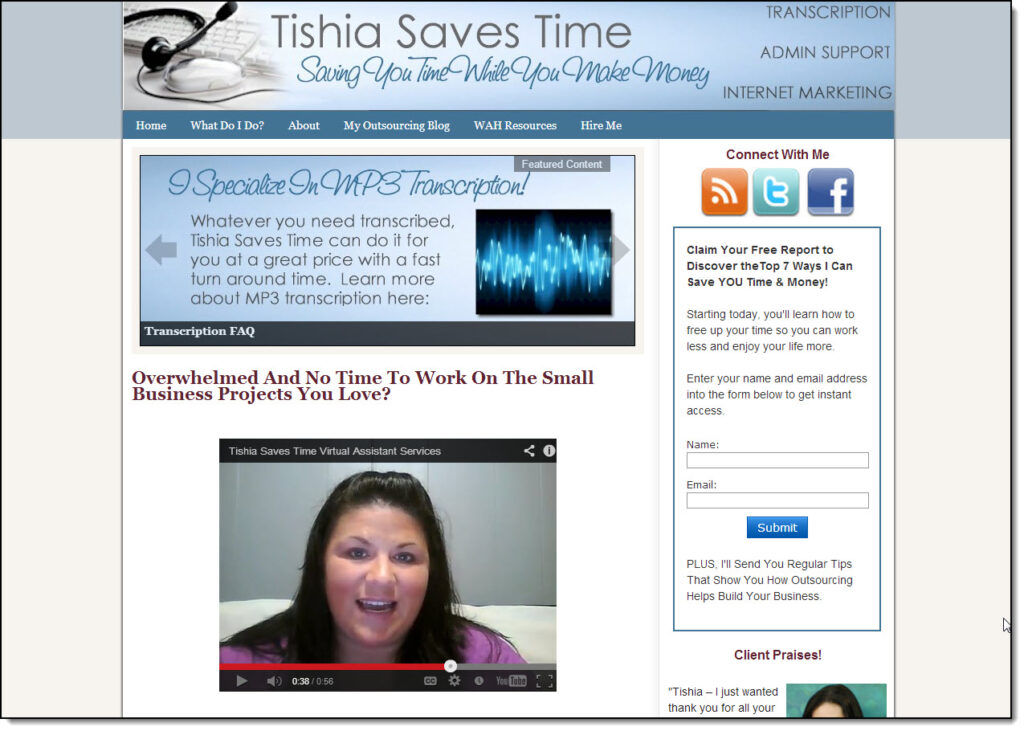
Virtual Assistant Tishia makes great use of every portion of her website.
- Her business has a catchy name that is easy to remember – and showcases her biggest client advantage (saving them billable time)
- Her “Featured Content” box caters to the modern demand for interactivity. (It scrolls through highlighting different features and benefits her services supply.)
- Her video gives potential clients a taste of her personality (and again, the video provides more interactive content)
She also features:
- A prominent sign up web form with an incentive (“Claim Your Free Report to Discover the Top 7 Ways I Can Save YOU Time and Money”)
- Share buttons and an RSS feed subscription button
- A call to action (“Connect with me”)
- “Client Praises” just visible above the fold, for those who need more social proof
- A relevant header graphic
- Colors that help maintain the professional feel of this site
- Lots of “white space”, to keep the reader’s eyes focused on her message and sections
- Helpful menu tabs that promise to tell the potential client at a glance what that client most likely wants to know
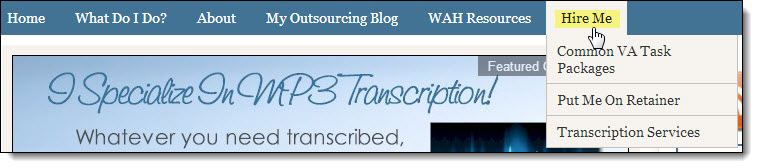
When you design your own web content, remember: It’s all about telling potential clients what they most want to know and making it as easy as possible for them to hire you.
Get set up on What’s Up:
If your client is already on What’s Up, she will appreciate seeing your What’s Up info on your virtual professional business website.
What to Have Ready when Potential Clients Inquire about Your Virtual Professional Business
A potential client contacts you when you’re right in the middle of a client project, racing towards a deadline. You don’t want to put that client off till later (especially if she looks like a great prospect): Neither do you want to put your project on hold while you scramble to answer the new potential client’s questions (and hunt for that rate sheet you know you created some time last autumn).
Question: So what do you do?
Answer: Create a “Client Kit” folder and have it sitting ready on your Desktop, to be accessed with one click.
(Make a back-up of your “Client Kit” and keep it in your documents file and in an external storage source like Dropbox or a memory stick. If your computer has a bad crash, you will not be able to restore files saved on the Desktop.)
Your “Client Kit” folder should contain:
- One or more eMail Templates – For responding to inquiries.
(Include a short version and a longer version that lists your packages and terms.) - Your Price List – For your own reference, if nothing else!
- A Client Profile Sheet that you can fill in, should that client make a commitment to come on board
- A Client Questionnaire – Clients are very impressed when you fire them off a professionally-written questionnaire they can fill in, detailing their proposed project.
Make your Questionnaire simple. That doesn’t mean “general” or “sketchy”. Take some time to make each field crystal-clear. Each question should prompt the client so that she knows exactly what to answer.
Your Questionnaire should achieve four important goals:
- It should tell you everything you need to know about a new project, at a glance
- It should help your client think about her project and tell you clearly what she wants
- It should pre-qualify your client
- It should prevent the ESP-Assumption Syndrome, where your client assumes you are able to read her mind and you assume she’s told you everything about the project.
Not only will a completed questionnaire help you better estimate and price their project (as well as see if you can fit it in), but it will help bolster the potential client’s impression that you are competent and know what a project such as his or hers entails.
(Note: You can create a simplified version for exploratory purposes only and a more thorough version for when the client actually commits.)
Also feel free to include simple, single-page handouts for anything else you feel your client might request initially. You will likely want to create specialized handouts or forms geared towards your unique virtual professional business.
Keeping a “Client Kit” folder on your desktop should make inquiries virtually painless – and much less of a distraction. Your virtual professional business will be a client magnet for success with clients in no time!
Leave a Reply